

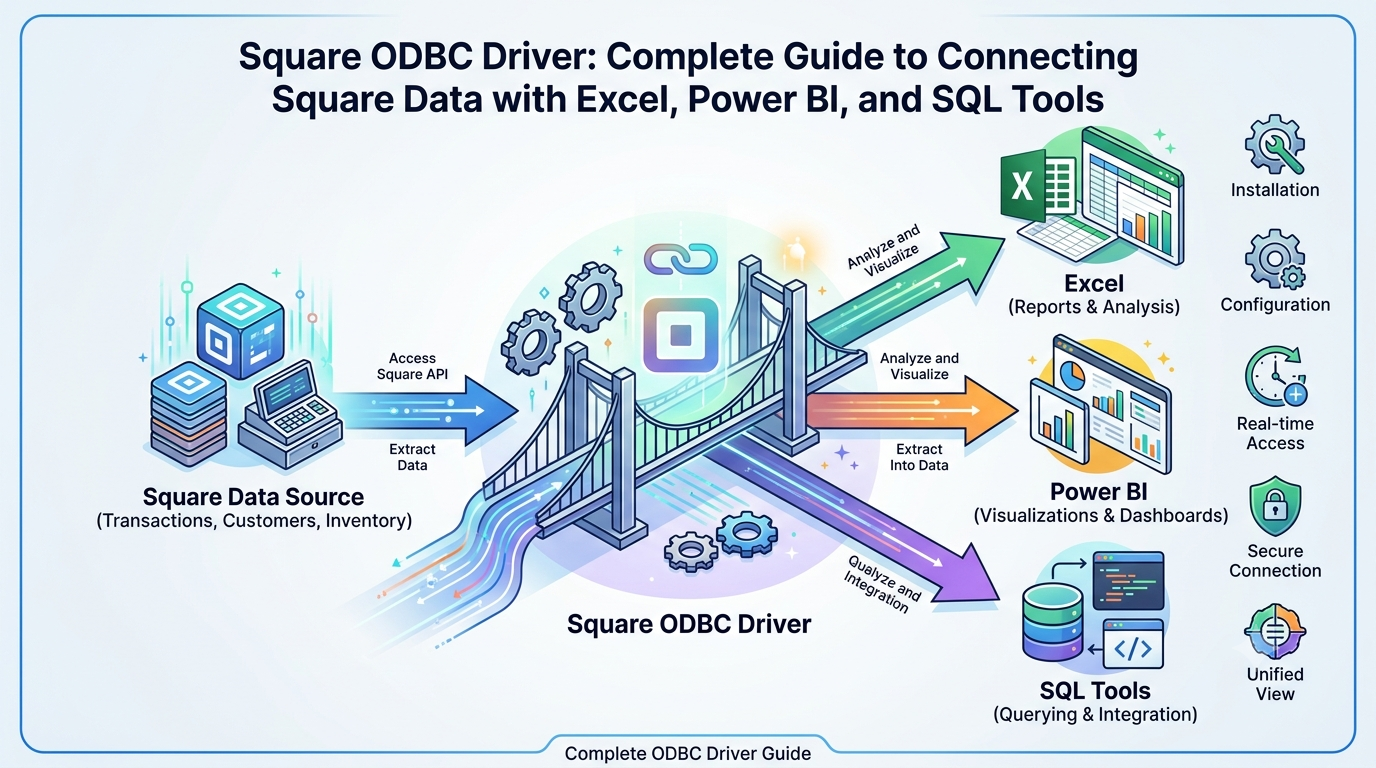
Businesses today rely on accurate data to make better decisions. Whether you own a small retail shop, manage an online store, or operate multiple business locations, understanding your sales, customers, inventory, and payments is essential. Square provides businesses with a powerful payment processing and point-of-sale platform that stores valuable business information. However, many organizations also want to analyze this data using tools such as Microsoft Excel, Power BI, Tableau, SQL Server, or other reporting software.
This is where a Square ODBC Driver becomes useful. It acts as a bridge between your Square account and applications that support Open Database Connectivity (ODBC). Instead of manually exporting reports, users can connect compatible software directly to Square data and create reports, dashboards, and business insights more efficiently.
It is important to understand that Square officially provides APIs for developers, but it does not currently provide its own native ODBC driver. Instead, several third-party software companies develop ODBC drivers that securely communicate with the official Square API. These drivers make it possible to access Square data using standard SQL queries while following the authentication methods supported by Square.
This guide explains everything you need to know about a Square ODBC Driver, including how it works, its benefits, supported applications, and practical business use cases. Whether you are a developer, business owner, or data analyst, this article will help you understand how these tools simplify data access and reporting.
What Is a Square ODBC Driver?
A Square ODBC Driver is software that allows ODBC-compatible applications to communicate with data stored in a Square account through the official Square API.
ODBC, which stands for Open Database Connectivity, is an industry-standard technology that allows different software applications to connect to various data sources using a common interface. Instead of learning different connection methods for every platform, users can use ODBC-supported tools to access data in a familiar way.
Because Square stores business information through its cloud platform, an ODBC driver translates SQL requests from reporting software into API requests that retrieve data from Square. The driver then returns the results in a format that applications such as Excel or Power BI can understand.
This process allows users to work with live or near real-time business information without manually downloading reports.
Why Businesses Use a Square ODBC Driver
Many businesses collect large amounts of operational data every day. While Square provides built-in reporting, some organizations require more advanced analysis or customized dashboards.
Using a Square ODBC Driver provides several advantages.
Easier Reporting
Instead of exporting CSV files repeatedly, users can connect reporting software directly to Square data.
Better Business Intelligence
Business intelligence tools such as Microsoft Power BI and Tableau can create interactive dashboards using Square sales and customer information.
SQL-Based Queries
Developers and analysts who already know SQL can query Square data without manually working with API endpoints.
Automated Workflows
Many organizations automate reports that update regularly instead of creating them manually every week.
Improved Decision Making
Having quick access to sales, inventory, customer, and payment data helps businesses identify trends and make informed decisions.
How Does a Square ODBC Driver Work?
Although each software provider may have its own interface, the basic process is generally similar.
Step 1: Install the Driver
The first step is installing a compatible third-party Square ODBC Driver on your computer or server.
Step 2: Authenticate with Square
The driver securely connects to your Square account using the authentication method supported by Square, such as OAuth.
Step 3: Create a Data Source
After authentication, you configure an ODBC Data Source Name (DSN), which stores the connection settings.
Step 4: Connect Your Application
Applications like Microsoft Excel, Power BI, Tableau, SQL Server, Crystal Reports, or other ODBC-compatible software connect to the DSN.
Step 5: Query Data
Once connected, users can retrieve available Square data using SQL queries or built-in reporting tools.
Data You Can Commonly Access
Depending on the capabilities of the driver and your Square account permissions, you may be able to access data such as:
- Payments
- Orders
- Customers
- Inventory
- Catalog Items
- Products
- Refunds
- Team Members
- Locations
- Transactions
- Gift Cards
- Taxes
- Discounts
Having access to these datasets allows businesses to build customized reports that match their operational needs.
Key Features of a Square ODBC Driver
Although features vary depending on the third-party provider, most Square ODBC Drivers offer similar capabilities.
Secure API Connection
The driver connects securely to the official Square API using encrypted communication and modern authentication methods such as OAuth. This helps protect business data during transmission.
Standard SQL Support
One of the biggest advantages is the ability to use SQL queries. Developers and analysts can retrieve information without learning the details of every API endpoint.
Real-Time Data Access
Many drivers provide access to current business data. This means reports can reflect recent sales, customer activity, inventory updates, and transactions instead of relying on manually exported files.
Easy Integration
Most ODBC drivers work with software that already supports ODBC connections, making integration much easier for businesses.
Business Reporting
Instead of creating reports manually every day, users can generate automated dashboards and scheduled reports using connected applications.
Software That Commonly Supports ODBC
A Square ODBC Driver can usually connect with many popular business applications.
Some commonly used software includes:
- Microsoft Excel
- Microsoft Power BI
- Tableau
- SQL Server
- Crystal Reports
- Qlik Sense
- DBeaver
- SAP Crystal Reports
- IBM Cognos
- MicroStrategy
Support depends on the specific ODBC driver you choose.
How to Install a Square ODBC Driver
The installation process is generally straightforward.
Download the Driver
Choose a trusted third-party provider that supports Square integration and download the appropriate version for your operating system.
Install the Software
Run the installer and complete the installation by following the setup instructions.
Configure Authentication
Connect the driver to your Square account using the supported authentication method. Most providers guide users through the authorization process.
Create an ODBC Data Source (DSN)
After authentication, configure a Data Source Name (DSN). This stores your connection settings so applications can easily connect.
Test the Connection
Most drivers include a connection test. Running this test confirms that your application can successfully communicate with your Square account.
Common Business Use Cases
Businesses use Square ODBC Drivers for many practical purposes.
Sales Reporting
Managers can create daily, weekly, monthly, or yearly sales reports using live data instead of exporting files manually.
Customer Analysis
Customer purchase history can help businesses understand buying behavior and improve marketing strategies.
Inventory Monitoring
Retail stores can monitor inventory levels, product performance, and stock movement through customized dashboards.
Financial Reporting
Accounting teams often combine payment data with other financial systems to prepare internal reports.
Business Intelligence
Power BI and Tableau dashboards help owners visualize revenue trends, customer growth, seasonal demand, and product performance.
Example Scenario
Imagine a retail company with three store locations using Square for payment processing.
Instead of downloading separate reports from each location every week, the business connects a Square ODBC Driver to Power BI.
The dashboard automatically displays:
- Total daily sales
- Best-selling products
- Store comparisons
- Customer purchase trends
- Payment summaries
- Inventory movement
Managers can review updated information in one place, saving time and improving decision-making.
Benefits of Using a Square ODBC Driver
Businesses choose these drivers because they simplify access to important data.
Some major benefits include:
Saves Time
Automated connections reduce the need for repeated CSV exports.
Better Accuracy
Direct connections reduce the risk of manual data entry errors.
Improved Productivity
Employees spend less time preparing reports and more time analyzing business performance.
Scalable Solution
As a business grows, automated reporting becomes even more valuable.
Supports Better Decisions
Access to timely business data helps managers respond quickly to changes in sales, customer demand, and inventory.
Best Practices
To get the most value from a Square ODBC Driver, consider these recommendations.
Protect Access Credentials
Store authentication credentials securely and never share them unnecessarily.
Use Strong Account Security
Enable multi-factor authentication on your Square account whenever available.
Limit User Permissions
Only authorized employees should have access to business reporting systems.
Update the Driver
Install updates provided by the driver vendor to maintain compatibility, improve performance, and receive security fixes.
Monitor API Usage
If your reports access large amounts of data, monitor API usage to avoid unexpected limits or performance issues.
Troubleshooting Common Square ODBC Driver Issues
Even after proper installation, users may occasionally experience connection or performance problems. Most issues can be resolved with a few basic checks.
Authentication Errors
If the driver cannot connect to your Square account, verify that your authentication has not expired. Some drivers require you to sign in again or refresh the authorization token.
Connection Failed
A failed connection may occur because of incorrect DSN settings, internet connectivity problems, or outdated driver software. Double-check your configuration and test the connection again.
Missing Data
If certain tables or records do not appear, make sure your Square account has permission to access that information. Some data may also depend on your account type or API permissions.
Slow Query Performance
Large datasets may take longer to load. Filtering results, limiting the number of records returned, and retrieving only the fields you need can improve performance.
Security Considerations
Business data often includes sales information and customer records, so security should always be a priority.
Follow these best practices:
- Use trusted ODBC driver providers.
- Keep your operating system and driver software updated.
- Protect authentication credentials and API access tokens.
- Enable multi-factor authentication for your Square account when available.
- Grant reporting access only to authorized users.
- Regularly review connected applications and remove those you no longer use.
These practices help reduce security risks while protecting valuable business information.
Choosing the Right Square ODBC Driver
Since Square does not provide its own native ODBC driver, selecting the right third-party solution is important.
When comparing products, consider factors such as:
Compatibility
Ensure the driver supports your operating system and reporting software.
Performance
Choose a driver that handles large datasets efficiently and provides reliable data retrieval.
Security
Look for providers that support secure authentication and encrypted connections.
Documentation
Good documentation and setup guides make installation much easier, especially for first-time users.
Customer Support
Reliable technical support can save time if you encounter configuration or connectivity issues.
Tips for Better Reporting
To create useful business reports, keep these recommendations in mind:
- Focus on key performance indicators (KPIs) such as sales, revenue, inventory, and customer growth.
- Schedule automatic report updates whenever possible.
- Organize dashboards so important metrics are easy to understand.
- Archive historical reports for long-term business analysis.
- Review your reports regularly to identify trends and opportunities for improvement.
Conclusion
A Square ODBC Driver is a valuable solution for businesses and developers who want to analyze Square data using SQL-compatible applications. By connecting Square with tools such as Microsoft Excel, Power BI, Tableau, SQL Server, and other reporting platforms, organizations can automate reporting, improve data analysis, and make better business decisions.
It is important to remember that Square provides official APIs for developers, while ODBC drivers are generally offered by trusted third-party software vendors. Choosing a reliable driver, following recommended security practices, and maintaining proper configuration will help ensure a smooth and secure reporting experience.
Whether you manage a small business or a growing enterprise, understanding how a Square ODBC Driver works can help you unlock the full value of your business data and create more efficient reporting workflows.
FAQ Section
1. What is a Square ODBC Driver?
A Square ODBC Driver is third-party software that allows ODBC-compatible applications to access data from a Square account through the official Square API.
2. Does Square provide its own ODBC Driver?
No. Square provides official APIs for developers, but native ODBC drivers are generally developed and maintained by third-party software vendors.
3. Which applications can use a Square ODBC Driver?
Many ODBC-compatible applications, including Microsoft Excel, Power BI, Tableau, SQL Server, Crystal Reports, and DBeaver, can connect through a supported driver.
4. Is a Square ODBC Driver secure?
Yes, when you use a trusted provider and follow recommended security practices such as encrypted connections, secure authentication, and proper access controls.
5. Who should use a Square ODBC Driver?
Business owners, developers, data analysts, accountants, and organizations that need advanced reporting or business intelligence from Square data can benefit from using a Square ODBC Driver.